Security#
In general Application Security deals with the following topics:
User Identification and Authentication#
BPMNServer does not provide user identification and authentication component, but relies on the calling application to authenticate the user. The companion package BPMN-web provides full authentication and identification as a mere demo.
Every API call names the user it runs for: a principal your application built after authenticating the user (since 3.x, a call without one is refused; there is no default user).
Web App example/ Server Side Scripts#
import { SecureUser, SystemUser } from 'bpmn-server';

const user1 = new SecureUser({ userName: 'user1', userGroups: ['Owner', 'Others'], tenantId: 'acme' });

await api.engine.start(modelName, data, user1, options);
tenantId keeps a tenant's instances and models apart: the user's calls see only its tenant's.
SystemUser is for system work (setup scripts, scheduled jobs); security rules are not applied to it.
Runtime and administration APIs#
BPMNAPI runs processes and reads models. Changing models (save, delete, rename, export) needs
BPMNAdminAPI. Give the runtime API to the parts of the application that run processes (task lists, forms,
integrations), so they can not change models; the admin API only to deployment and model administration.
WebAPI/REST#
Since WebAPP is already authenticated by **APIKey** is trusted to pass user object
    // get api-key from header
    // url/engine/start

    await api.engine.start(processName,data,user,options);
Using BPMNClient as a service#
    const client= new BPMNClient(url,apiKey);
    // userId is passed here bypassing authentication, assuming user is already authenticated

    // await server.engine.start(processName,data,startNode,userId,options);
    let response = await server.engine.start('Buy Used Car', { caseId: 1050 },null,'user1');

    //await  server.engine.invoke(query, data, userId);

    response = await server.engine.invoke({id: response.id , "items.elementId": 'task_Buy' },{},'user1');
Access Control Rules#
bpmn along with Camunda Extensions, provide adequate means of defining access Rules:
Task Assignment#
The following properties can be defined for each User Task
| Property | Description |
|---|---|
| assignee | defines the userName to perform the task |
| candidateUser | defines potential users that can perform the task |
| candidateGroups | defines potential userGroups whose members can perform the task |
| dueDate | Date the task is due |
| followUpDAte | Date to followup |
| priority | Task periority |
Values provided in the model editor, can be static string or an Model Expressions
Process Initiator#
You can define the variable name for the instance initiator
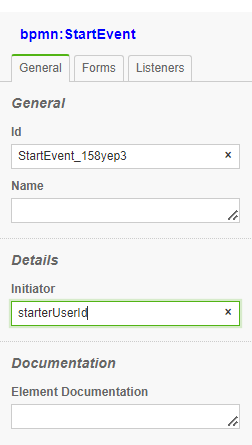
This will assign the userId of that started the process
Pool as a role#
BPMNServer allows you to define pools and using the pool name as userGroup
BPMN Editor#
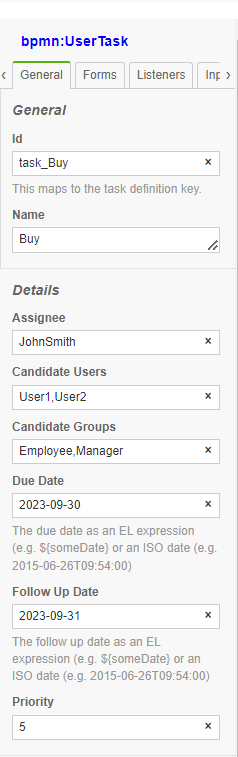
At the start of the userTask the designer values are evaluated into the instance item.
These fields can accept the following:
-
A string value
-
JavaScript expression
$(this.data.requester) -
JavaScript Async function call
$(return services.getSupervisorUser(this.data.requester))
For example: variable data.dueDate is copied into item.dueDate
Manual Assignment#
An application can prove a UI to allow users to assign tasks to others, this can be done throught the 'assign' method:
    const assignment = {assignee: 'user3', candidateUsers: ['user4','user5'],dueDate: new Date()};
    const newData={var1:650};


    response = await server.engine.assign({id: response.id , "items.elementId": 'task_Buy' },newData,userId,assignment);
Access Control Enforcement#
Security Rules:#
The security rules are on unless .env turns them off: ENFORCE_SECURITY=false, or REQUIRE_AUTHENTICATION=false.
A new application's .env has both true.
When security checks are bypassed#
- A user in the
ADMINorSYSTEMgroup has privileged access according to the engine's access-control checks. - For a
SecureUsercreated without an explicitenforceSecurityoverride, the engine disables task access checks when eitherREQUIRE_AUTHENTICATION=falseorENFORCE_SECURITY=falseis set in the environment. This decision is made when that user is constructed. new SecureUser(userInfo, { enforceSecurity: true })explicitly enables security checks for that user, regardless of the environment default.
Production security
Set both REQUIRE_AUTHENTICATION=true and ENFORCE_SECURITY=true for a network-accessible application. The host must authenticate callers and pass a trusted principal; never let an untrusted client choose privileged groups or use SystemUser. See the implementation in packages/bpmn-server/src/API/SecureUser.ts.
User can View/Assign Item if:#
-1. Item has no restrictions if (Assignee==null and CandidateUsers == null and CandidateGroups==null)
-2. User has a group indicated in item.CandidateGroups
User can Execute Item if:#
-1. User is the Assignee
Scenarios:#
-1. User is Assignee
-- Can Invoke/Complete Task
-- Can Assign to another User
-2. User is not Assignee but Can View (see rules above)
-- Can Assign Task to either another user or self (Take Task)
-- Then User can Invoke Task
Searching for Assignment Data#
api.data provides a method api.data.getPendingUserTasks that User Task that a User has access to.
Alternativly, to search for specific items for a particular user or group:
    var res = await server.dataStore.findItems(
        {
            "items.status": "wait", "items.elementId": "task_Buy",
            "$or": [
                {"items.candidateUsers":"user5"},
                {"items.candidateGroups":"group1"},
                {"items.candidateGroups":"group2"},
                ]

        }
    );
The above will return all items Buy Tasks in wait state assigned to 'user5' or 'group1' or 'group2'
If you have selected to enforce Security Rules, the above will by automatically done for you.
-- check following if covered here
Demo Application Authentication and Security#
A new application (npx bpmn-server init) has sign-in and the security rules on: its .env has
Answering no to init's "Require sign-in and security rules?" writes both false, for development on your own
machine only. Either setting left out of .env counts as on.
An application made before 3.6 may have both false in its .env: set them to true before anyone else can reach
it. In production (NODE_ENV=production), REQUIRE_AUTHENTICATION=false stops the server at start unless
ALLOW_INSECURE_NO_AUTH=true.
The first administrator: a server with no users asks for one on its first page, with a setup token it prints
where it runs; ADMIN_PASSWORD, when set, creates admin instead. See The first start.
A public demo#
To let the public try a bpmn-web server, turn administration off:
With it, nobody can reach the administration pages (/dashboard/admin, /admin, impersonating another user,
deleting instances, resetting data, backup, restart) or the /admin/api and /admin/api2 REST APIs. That
includes administrators, and it holds even with REQUIRE_AUTHENTICATION=false; those pages and APIs answer 404.
Everything else works as usual. To administer the server, use its console (npm run cli) on the machine.
A safe demo setup:
- Visitors sign up (
/signup) and sign in. A new account has no groups: it can start processes and work on its own tasks, but it cannot design models or administer anything. - Do not give visitors the
DESIGNERgroup, and do not run a demo withREQUIRE_AUTHENTICATION=false. Without authentication, every visitor is a designer. Models contain scripts, and scripts run inside the server process with its permissions: whoever can save a model can run code on the server. - To let visitors write and run their own models, also set
DEMO_MODE=true, which sets these (each can be set by itself):- Scripts and expressions run in a sandbox (QuickJS, a JavaScript engine compiled to WebAssembly). They
have no access to Node.js, files, the network or the server's objects, and each one stops after 200 ms.
Calling
appServicesfrom a script returnsundefined. - Timers are disabled so they do not keep the server busy. A timer event waits until it is invoked, and no process starts on a timer.
- Service tasks do not run: they end with no output.
- Each of these says so in the run's decisions (the Test tab's "Why").
- Scripts and expressions run in a sandbox (QuickJS, a JavaScript engine compiled to WebAssembly). They
have no access to Node.js, files, the network or the server's objects, and each one stops after 200 ms.
Calling
- Run the demo on its own machine or container, with its own database. Give it no secrets it does not need (no SMTP account, no API keys of other systems), and reset its database on a schedule.
- Set
API_KEYandADMIN_API_KEYto long random values, or leaveSERVE=uiso that only the web pages are served.
What runs#
Each of these is a setting of its own, and says what it changes. DEMO_MODE=true only gives them other values when they
are not set; one that is set wins.
| Variable | Default | With DEMO_MODE=true |
What it does |
|---|---|---|---|
SCRIPT_SANDBOX |
false |
true |
true: scripts and expressions run in a sandbox (Where scripts run). |
SCRIPT_SANDBOX_SERVICES |
true |
false |
With the sandbox, true: a script's calls to appServices and appUtils run, so those must be safe for whoever writes a model to call. false: they run nothing and return undefined. |
TIMERS |
true |
false |
false: a timer event waits until it is invoked, and no process starts on a timer. |
SERVICE_TASKS |
true |
false |
false: service tasks and connectors call nothing and end with no output. |
Signing up has settings of its own:
| Variable | Default | What it does |
|---|---|---|
SIGNUP_VERIFY_EMAIL |
false |
true: signing up sends a verification email (SMTP_USER, SMTP_PASSWORD), and SIGNUP_GROUPS come once it is verified. |
SIGNUP_GROUPS |
none | The user groups of an account that signs up, separated by commas. DESIGNER: it can design. |
SITE_URL |
the request's | The address links in emails use. Set it on a public server. |
Handling Access Control#
Here is a typical flow of a Process:
- User1 will
StartProcessRequest Vacation - System will store the initiator as
item.data.requester='User1' - Since Task Request has
assignee=item.data.requesteronlyUser1can invoke this task - Once Task Request is completed by User1 , Task Approve will be created.
-
Task ApproveNeed to be assigned to the requester supervisor A Javascript event trigger onstart' will determine the supervisor userName and assign it the task Assuming appServices class contain such an async method that my call MongoDB Alternatively; in the model editorassigneefield$(appServices.getSupervisor(this.data.requester))` -
To
Notifythe supervisor user, a JS trigger will invokenotifyfunction
Filtering data for Security:#
let pending = await bpmnAPI.data.findItems({ "items.status": 'wait', "items.type": 'bpmn:UserTask' }, user);
item.assignee