The Settings page#
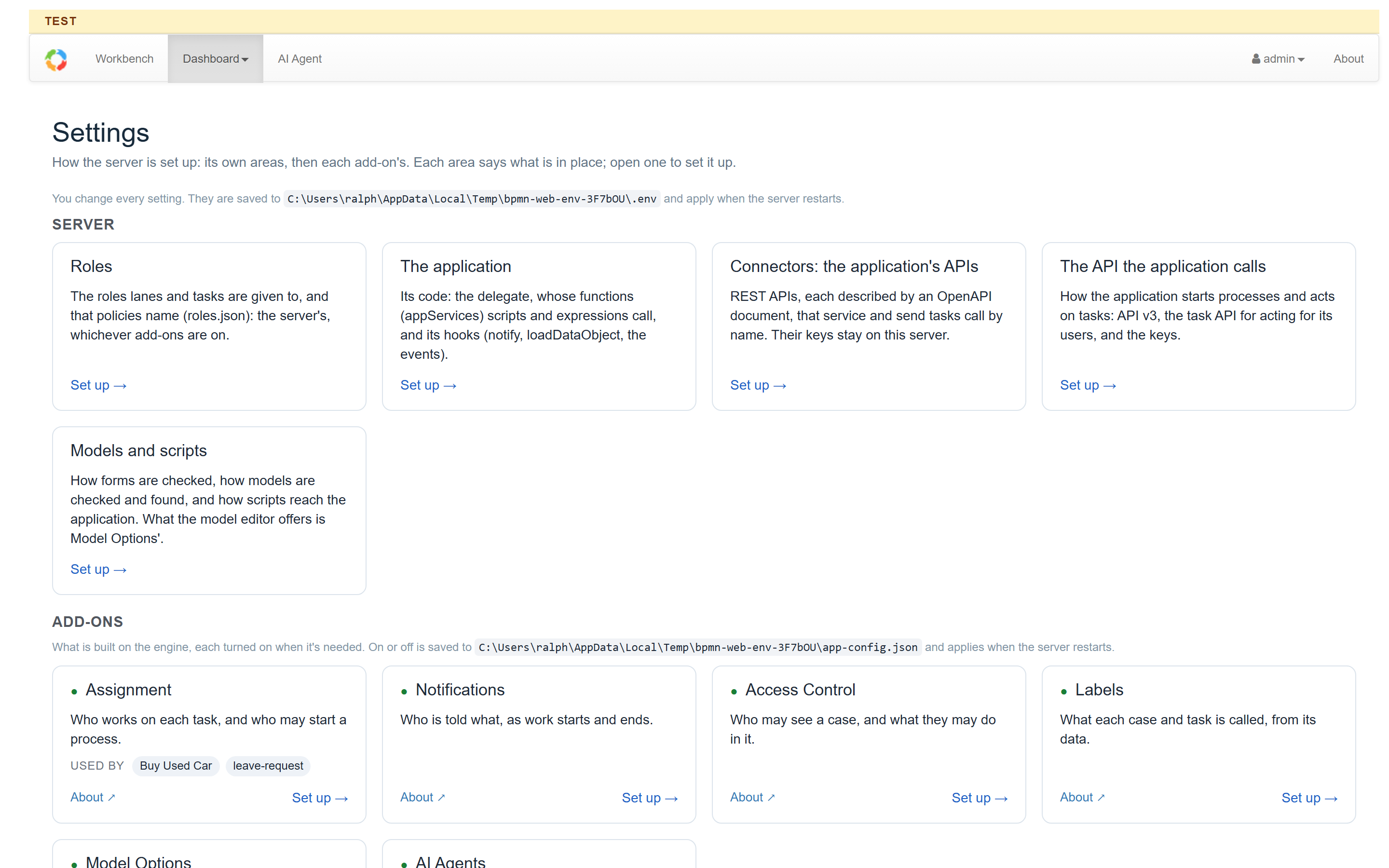
Dashboard ▸ Settings (/dashboard/settings; /dashboard/integration before 3.7.5, which still leads here) is
where administrators and designers set up the server, and turn the add-ons on and off. It opens on an overview in
two groups: Server, an area for each part of the server that is no add-on's, then Add-ons, an area for each
add-on, with its own settings. Each card says in a line or two what is in place, what needs setting up (Site address
not set, Email is off), whether the add-on is on, and restart to apply when a saved change waits for a restart.
A card opens its area's page (/dashboard/settings/<area>): what is in place, its main settings, and the rest under
More settings. Saving comes back to that page.
Server
| Area | Shows | Settings (main first) |
|---|---|---|
| Roles | The roles (the application's app-contract.json): the server's, whichever add-ons are on |
none |
Security (secure) |
Who can reach this server, what each of them may do, and what its models may run — the three apart, with the effective configuration in plain words and a warning for a combination that is not safe. What each role is allowed to do: a table with a row for each role — PUBLIC (not signed in), User (anyone signed in), SYSTEM (the server itself), then the application's own — and a column for each permission (User, Designer, Administrator). Every cell is a tick, saved to the application's app-contract.json: a role the contract does not mention keeps the server's default for its name, one it mentions decides for itself either way, so a role can be given Administrator or have it taken away. A save that would leave no role an administrator is refused. DISABLE_ADMIN, DISABLE_DESIGN, READ_ONLY, ENFORCE_SECURITY, REQUIRE_AUTHENTICATION, ALLOW_INSECURE_NO_AUTH and SECURITY_POLICY are not offered as settings here — they decide for everyone, which the table says — and stay settable in .env |
Access: REQUIRE_AUTHENTICATION, ENFORCE_SECURITY; ALLOW_INSECURE_NO_AUTH, SESSION_SECRET, SECURE_COOKIES, AUTH_RATE_LIMIT, the sign-up settings, ADMIN_PASSWORD. What they may do: READ_ONLY, DISABLE_ADMIN, DISABLE_DESIGN; SECURITY_POLICY. Credentials: API_KEY, ADMIN_API_KEY, API_ACTING_USER_KEY, API_IMPERSONATION, API_RATE_LIMIT, AI_ACCESS, AI_KEY_TTL_GROUPS. What runs: SCRIPT_SANDBOX; SCRIPT_SANDBOX_SERVICES, SERVICE_TASKS, TIMERS, DEMO_MODE, CONNECTORS_ALLOW_HOSTS |
| The application | The delegate's class, its functions (appServices) and methods (folded), who signs people in |
APP_ENV, SITE_URL; APP_ENV_LABEL |
| Connectors | Each connector: enabled or not, its key (last 4 characters), the models that call it | SECRETS_KEY; CONNECTOR_CATALOG_URL |
| The API the application calls | API v3, and whether the task API (/api2/tasks) is on |
the service account (API_SERVICE_USER_NAME, its groups, tenant and models owner). Its keys are Security's |
Models, forms and scripts (models) |
FORM_RULES, ELEMENT_TEMPLATES; VERIFY_MODELS_ON_IMPORT, CATALOG_URL. What a model may run is Security's |
|
| AI agents | AI_ACCESS; AI_GUIDE |
Add-ons: each add-on's area is named by it (/dashboard/settings/policies), and its settings are the ones its
manifest declares (addon.json, settings: each a .env name, its label, editor: "designer" when a designer
changes it too, main to show it first); its card says what it is in a few words (brief) and links to its doc
page (docs, opened in a new tab). An application's own add-on gets an area the same way. An add-on's area
says whether it is on and which models use it; what it has (the Policies add-on's roles) shows while it is on, and its
settings are kept while it is off.
| Area | Shows | Settings (main first) |
|---|---|---|
| Assignment | The assignment policies | none of its own |
| Notifications | The notification policies; who delivers notifications (the delegate's notify, or email), how many are kept, by status |
NOTIFICATIONS, EMAIL_ENABLE, EMAIL_FROM, SMTP_USER, SMTP_PASSWORD; EMAIL_LOG |
Access Control (security) |
The security policies, and whether they are on | SECURITY_POLICY |
| Labels | none of its own | |
| Extended Forms | none of its own | |
| Model History | MODEL_HISTORY |
Each area's page links to where its parts are managed: the connectors, the roles (Administration), the policies
(Design), the notifications. Before 3.7.5, Roles and policies and Notifications were areas of their own: the roles
are the server's (Roles), the policies the Assignment, Access Control and Notifications add-ons'
(/dashboard/settings/notifications leads to Notifications); and Forms, scripts and the model editor is Models,
forms and scripts (models), its MODEL_HISTORY the Model History add-on's.
Add-ons on and off#
Each add-on's card (Add-ons) says whether it is on and which models use it, and has its switch: an administrator turns it on or off there (Turn off / Turn on), or in its area; designers see them.
- Saved to
app-config.json, the application's, beside its.env(appConfigin the configuration names another):{ "addOns": ["assignment", "labels"] }. Its other settings are kept.policies, one add-on before 3.7.5, means the three it became: Assignment, Notifications and Access Control. - No
app-config.json, or noaddOnsin it: every add-on is on, as before 3.7.5. - It applies when the server restarts. Until then the add-on shows how the server runs, marked restart to apply.
- A model that uses an add-on that's off keeps its attributes; the engine ignores them, and the model's checks
say so (
add-on-off).
| Add-on | What it is |
|---|---|
| Assignment | Who works on each task and who may start a process (assignee, candidates, lanes, assignment policies), and the actors expressions read |
| Notifications | Who is told what (notification policies), kept and delivered |
Access Control (security) |
Who may see and do what (security policies) |
| Labels | What each case and task is called (owf:label, owf:endLabel), and their values as the lists' columns. Off: a case is shown as <model> #<caseId>, a task by its name |
| Extended Forms | A form field's choices from a source: a drop-down (owf:list) or a search (owf:lookup); a list's value held to its choices |
| Model History | The editor's Test tab (scenarios) and History tab (each save kept as a version) |
Who changes what#
- Administrators change every setting.
- Designers change the design-side settings, marked designers too:
FORM_RULES,ELEMENT_TEMPLATES,VERIFY_MODELS_ON_IMPORTandMODEL_HISTORY. They see the other settings but cannot change them, and a form posted with one is refused. - Everyone else can't open the page.
How a change is saved#
- A change is written to the server's
.env. The file as it was before is kept as.env.bak. Other lines and comments are left as they are. - It applies when the server restarts. Until then the page shows the running value, marked restart to apply. An administrator can restart from Administration when a supervisor (Docker, pm2, systemd) restarts the server.
- Each value is checked against the settings schema: a number,
trueorfalse, one of its choices, a minimum length. If any value is wrong, nothing is saved, and the page says why. - An empty field removes the setting from
.env, so its default applies. - A secret (a key, a password) is never shown, only whether it is set. You can type a new value, have a random key generated, or remove it. Leaving the field empty keeps it.
- A setting the environment gives (Docker, systemd, the shell) wins over
.env, so the page shows it and doesn't change it: change it where it is set. - An application that gives its own API settings (
hostSettings) keeps them: the API section shows them and doesn't change them. - With a separate engine (
ENGINE_AT), the page writes the host's.env. Copy the change to the engine's.envtoo, as Settings says.
An application can name the .env the page writes: envFile in start() or the WorkflowApplication. By default it
is the .env of the folder the server runs in.
Related#
- Settings:
.envand configuration: every setting. - Connectors, Assignment policies, Security, Notification policies.
- Custom delegates: the application's code.