Scripting#
- Introduction
- Model Expressions/Scripts
- Execution Listeners
- Application Listener
- Scripts Scope and variables
- Item Scope
- Execution Scope
- Conditions that give their value by next
- Variables of your own in scripts
Introduction#
BPMN-Server provides scripting throughout the workflow.
- The primary(default) script language is JavaScript.
- Python support is also available, using prefix $py at the start of any script.
Scripts are passed parameters values to the context:
Model Expressions/Scripts#
Model Expressions#
A value in a model is read one of three ways:
| Written as | Read as | Example |
|---|---|---|
$js, $(js) or ${js} (the whole value) |
an expression: the JavaScript's value, of its own type | ${data.amount > 1000}, $(data.requester) |
a text with ${...} parts |
the text, each part's value in its place | Order ${data.id} for ${data.customer} |
| anything else | the text as written (a list when it has commas, for assignments) | managers,auditors |
Expressions are JavaScript, and they see data, item, instance, input, output, appServices,
appUtils and appDelegate, not each process variable by name. Coming from Camunda, write
${data.amount > 1000 && data.approved} rather than ${amount gt 1000 and approved}: the model check
(bpmn-server verify, the editor's Problems) reports JUEL operators and names an expression does not have.
conditional flow examples:#
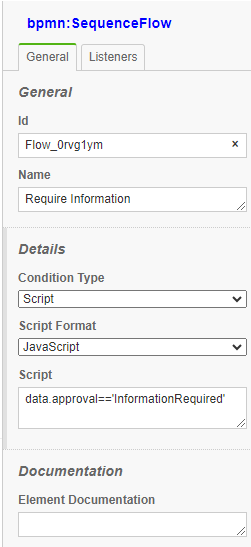
    data.approval=='Approved'
  or
    (data.approval=='Approved')
    (this.data.v1 + this.data.v2)
    (this.data.v1 == this.data.v2)
    (this.data.v1 + this.data.v2)>0
    (this.data.v1 + this.data.v2)<4
timers examples:#
For duration timers
Input/Output#
| Type | Example Value |
|---|---|
| Text/String | hello |
| List | [ 'str1', 'str2', item.data.myExistingVar ] |
| Map | \{ 'key1': 'val1', 'key2': 'val2' \} |
| JavaScript | data.item.myExistingVar |
| JavaScript | \{ 'key1': 'val1', 'key2': 'val2' , 'key3': [item.data.myExistingVar, 'hello'], 'key4': \{ 'ikey5': item.data.myExistingVar\}\} |
Assignment properties#
User Task Assignment properties can be JavaScript expression, in this case they must start with '$'
For example:
assignee $(this.data.requester) or ${data.requester}
candidateGroups ${data.region}-managers,auditors (filled in, then split at the commas)
Model Listeners#
Inside your model, you can attach Listeners to various nodes as JavaScript Listeners
These are similar to expressions above but can invoke async functions and can include more complete Javascript
No syntax required for these scripts
Examples#
    let userManager=await appServices.retrieveManagerForUser(item.userName);

    data.manager=userManager;

    if (data.var1>5) {
        data.message='any text here';
    }
Execution Listeners#
These are for all node types and processes
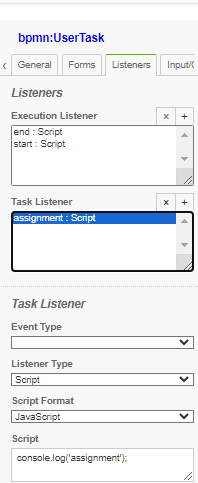
| event | Description |
|---|---|
| start | is fired at the start of item execution |
| end | is fired at the end of item execution |
Task Listeners#
These are for User Tasks only
| event | Description |
|---|---|
| assign | invoked after assign command is issued |
| validate | invoked after assign or invoke command is issued |
validate scripts have a special handling, that they can stop execution by raising errors, to return errors to the execution:
Application Listener#
You can place a listener in your application delegate or your execution scripts class to listen to all events Example:
    const api = new BPMNAPI(new BPMNServer(configuration,new Logger({ toConsole: false}),{cron:false}));

    let options= {option1:1234}; //,option2:SystemUser};

    api.server.listener.on('all', async function ({ context, event, }) {
        if (event=='process.restored')
            {
            context.options=options;
            context.options['restored']=true;
            }
        if (event.startsWith('process.'))
            console.log('---Event: -->' + event , context.options);
        else
            console.log('---Event: -->'+event, 'item:',context.item.elementId,context.options );
    });
Scripts Scope and variables#
Item Scope#
Items Expressions and Listeners have the following variables
| Variable | Description |
|---|---|
| item | reference the current item |
| this | same as item |
| data | item data object |
| input | item input |
| output | item output |
| appDelegate | reference to appDelegate object |
| appServices | reference to appServices object |
| appUtils | reference to appUtils object |
- Common Item properties:
- Item methods
- Execution (context) properties
Execution Scope#
Expressions and Listeners have the following variables
| Variable | Description |
|---|---|
| this | refers to execution object |
| appDelegate | reference to appDelegate object |
| appServices | reference to appServices object |
| appUtils | reference to appUtils object |
Application Listener#
You can place a listener in your application delegate or your execution scripts class to listen to all events Example:
    const api = new BPMNAPI(new BPMNServer(configuration,new Logger({ toConsole: false}),{cron:false}));

    let options= {option1:1234}; //,option2:SystemUser};

    api.server.listener.on('all', async function ({ context, event, }) {
        if (event=='process.restored')
            {
            context.options=options;
            context.options['restored']=true;
            }
        if (event.startsWith('process.'))
            console.log('---Event: -->' + event , context.options);
        else
            console.log('---Event: -->'+event, 'item:',context.item.elementId,context.options );
    });
Conditions in FEEL#
A sequence flow's condition is JavaScript unless it says otherwise: language="FEEL" makes it FEEL, over the data's values by name
(and data itself). ${...} around a condition is a wrapper, and does not change its language. As with JavaScript, the flow is taken
only when the value is true.
<bpmn:conditionExpression xsi:type="bpmn:tFormalExpression" language="FEEL">amount > 1000</bpmn:conditionExpression>
In the editor, a flow's Language offers FEEL. The Condition field follows it; the Problems tab checks a FEEL condition.
Conditions that give their value by next#
With a language of JavaScript, a condition may call next(error, value) instead of being an expression: on its own, or in statements. An
error fails the call, and if next is never called the flow is not taken. It must be called before the condition's code ends.
<bpmn:conditionExpression xsi:type="bpmn:tFormalExpression" language="JavaScript">
  if (data.amount > 1000) next(null, true); else next(null, false);
</bpmn:conditionExpression>
Variables of your own in scripts#
The application can add variables to what scripts and expressions see. Each is computed from a copy of the data each time, so changing it
does not change the process's. They can not replace data, item, instance, input, output, appServices, appUtils or
appDelegate, and models can not add them. It works the same in SandboxScriptHandler, and in FEEL conditions.
import { ScriptHandler } from 'bpmn-server';

const configuration = webConfiguration({
    scriptHandler: () => new ScriptHandler({ context: { environment: ({ data }) => ({ variables: data }) } }),
});
Where scripts run: in the server or in a sandbox#
Every script and expression in a model runs through the configuration's scriptHandler. bpmn-server has two:
ScriptHandler, the default. Scripts run in the server's own Node.js process, with its permissions. They see the real objects (this,data,item,appServices,appDelegate) and may call the application,awaitits services and use Node.js.SandboxScriptHandler. Scripts run in QuickJS, a JavaScript engine compiled to WebAssembly, with no access to Node.js, files, the network or the server's objects. bpmn-web uses it withSCRIPT_SANDBOX=true(What runs).
The default is chosen because the sandbox takes away what most applications use scripts for. Use the sandbox when the people who write the models are not trusted to run code on the server. Otherwise, keep the default.
ScriptHandler (default) |
SandboxScriptHandler |
|
|---|---|---|
| Who may write models | People trusted with the server: whoever saves a model can run code on it | Anyone |
The application (appServices, appDelegate, appUtils) |
Called directly | Calling one returns undefined, and the run's decisions say so; with callServices, appServices and appUtils run (below). No appDelegate |
require, Node.js, files, network |
Available | None |
| Data | The real objects | JSON copies in; only the keys a script changed are copied back |
| An item's fields a script may set | Any | assignee, candidateUsers, candidateGroups, dueDate, followUpDate, priority, vars |
| Limits | None | 200 ms and 32 MB per script |
| Cost of a script | Microseconds | A few milliseconds (copies, a QuickJS context); 650 KB of WebAssembly loaded on first use |
| Breakpoints in the Test tab's debugger | Yes: each script is compiled under its element's name | No: Node's inspector does not see into QuickJS (Evaluate still works) |
| JavaScript engine | V8, as the rest of the server | QuickJS: Date, Intl, error messages and stack traces can differ |
What changes when a model moves to the sandbox#
A model written for the default handler may still run, or may fail or behave differently. Watch for:
- Calls to the application. A script that reads
appServices.lookUp(...)getsundefined, unless the handler hascallServices. Move that work into a service task, which the application implements. - Objects that are not plain data. Class instances, functions, Buffers and object identity do not survive the copy. Dates do when the script leaves them alone.
- Long or heavy scripts. A loop over a large data set, or a wait on something slow, stops at the time or memory limit with an error.
- Writes the sandbox does not copy back. Setting any other field of
item, or anything onthis, is lost.
Choosing the handler#
In bpmn-web, SCRIPT_SANDBOX=true picks the sandbox and changes nothing else: timers and service tasks run, and so do a
script's calls to appServices and appUtils, unless SCRIPT_SANDBOX_SERVICES=false (see
What runs).
With callServices (SCRIPT_SANDBOX_SERVICES), whoever writes a model can call every method of appServices and appUtils, with any
arguments. They run in the server, with its permissions, so each must be safe to be called so. A method gets JSON
copies of its arguments and the script a JSON copy of what it returns, so this or item passed to a service is a
copy: what the service changes on it is lost, and it has no token or context. A script reaches methods only,
through plain objects: not a service's other objects (appServices.appDelegate), nor constructor and the like.
What a script waits for a service is not counted in its time limit.
An application that wants the sandbox otherwise sets the handler in its configuration:
import { SandboxScriptHandler } from 'bpmn-server';

const configuration = webConfiguration({
    scriptHandler: () => new SandboxScriptHandler({ timeLimit: 500, memoryLimit: 64 * 1024 * 1024, callServices: true }),
});
runSandboxed(values, body), from the same module, runs other code the same way.
Python#
A script that starts with $py is meant to run in Python (PYTHON_CMD, default python). This is a
prototype: it writes test values into the item's data and is not covered by tests, so do not use it in
models yet.